
Converting from Vega#
Use the Vega functions for charts authored in Vega or already compiled to Vega from Vega-Lite. VlConvert parses and evaluates the specification directly, so the Vega-Lite theme and vl_version options do not apply.
Available outputs: SVG, PNG, JPEG, PDF, HTML, a Vega Editor URL, and an evaluated scenegraph.
Save this Vega specification:
chart.vg.json
{
  "$schema": "https://vega.github.io/schema/vega/v6.json",
  "width": 300,
  "height": 180,
  "padding": 5,
  "data": [
    {
      "name": "table",
      "values": [
        {"category": "A", "value": 28},
        {"category": "B", "value": 55},
        {"category": "C", "value": 43},
        {"category": "D", "value": 91},
        {"category": "E", "value": 81}
      ]
    }
  ],
  "scales": [
    {
      "name": "xscale",
      "type": "band",
      "domain": {"data": "table", "field": "category"},
      "range": "width",
      "padding": 0.1
    },
    {
      "name": "yscale",
      "domain": {"data": "table", "field": "value"},
      "nice": true,
      "range": "height"
    }
  ],
  "axes": [
    {"orient": "bottom", "scale": "xscale"},
    {"orient": "left", "scale": "yscale"}
  ],
  "marks": [
    {
      "type": "rect",
      "from": {"data": "table"},
      "encode": {
        "enter": {
          "x": {"scale": "xscale", "field": "category"},
          "width": {"scale": "xscale", "band": 1},
          "y": {"scale": "yscale", "field": "value"},
          "y2": {"scale": "yscale", "value": 0}
        },
        "update": {"fill": {"value": "#4c78a8"}}
      }
    }
  ]
}
$ vl-convert vg2svg --input chart.vg.json --output chart.svg
$ vl-convert vg2png --input chart.vg.json --output chart.png
The other commands are vg2jpeg, vg2pdf, vg2html, vg2url, and vg2sg.
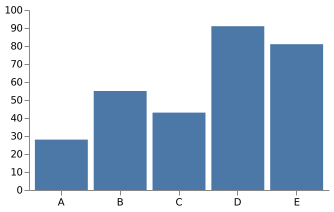
The SVG conversion renders this chart:
Size, locale, and other per-conversion options work the same way as for Vega-Lite. See Image Size and Quality Recommendations, Number and Time Locales, and Conversion Overrides.