
Plugin Loading and Security#
Read Vega Plugins first for the plugin contract and a complete startup example. This page covers where plugin code can come from and how to control its network access.
Choose a Loading Mode#
Startup plugins are part of the converter configuration. VlConvert loads them in order when a worker starts and makes them available to every conversion that converter performs. Use startup plugins for stable extensions maintained with the application.
Supported Plugin Sources#
A plugin entry can be one of three forms:
A
.jsor.mjsfile path. VlConvert reads and bundles the file before loading it.An
http://orhttps://URL. VlConvert fetches and bundles the module.Inline ESM source. Configuration files and library APIs accept source text. The
--vega-pluginCLI flag does not, so a mistyped path is never treated as executable source.
The file-based examples use the double-value.js plugin from Vega Plugins.
Use a path or URL with --vega-plugin:
$ vl-convert --vega-plugin ./double-value.js \
>   vl2svg --input chart.vl.json --output chart.svg
Here, chart.vl.json is the plugin-dependent input from Vega Plugins.
Put inline source in a JSONC config file:
plugins.vlc.jsonc
{
  "vega_plugins": [
    "export default function (vega) { vega.expressionFunction('answer', () => 42) }"
  ]
}
Control HTTP Imports#
A plugin can import other ESM modules. HTTP imports are blocked unless their domain matches plugin_import_domains. This plugin imports scaleLinear from esm.sh and registers a scaledPercent expression function:
scale-plugin.js
import { scaleLinear } from "https://esm.sh/d3-scale@4"

export default function registerScale(vega) {
  const scale = scaleLinear().domain([0, 1]).range([0, 100])
  vega.expressionFunction("scaledPercent", value => scale(value))
}
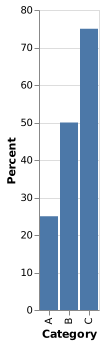
This chart calls scaledPercent to convert fractions to percentages:
scale-chart.vl.json
{
  "$schema": "https://vega.github.io/schema/vega-lite/v6.json",
  "data": {
    "values": [
      {"category": "A", "value": 0.25},
      {"category": "B", "value": 0.5},
      {"category": "C", "value": 0.75}
    ]
  },
  "transform": [
    {"calculate": "scaledPercent(datum.value)", "as": "percent"}
  ],
  "mark": "bar",
  "encoding": {
    "x": {"field": "category", "type": "nominal", "title": "Category"},
    "y": {"field": "percent", "type": "quantitative", "title": "Percent"}
  }
}
$ vl-convert \
>   --vega-plugin ./scale-plugin.js \
>   --plugin-import-domains esm.sh \
>   vl2svg --input scale-chart.vl.json --output scale-chart.svg
The resulting bars show values of 25, 50, and 75:
esm.sh matches that host only. *.jsdelivr.net matches the named host and its subdomains. * allows any domain and should be reserved for trusted code. Redirect targets must also match the allowlist.
The domain of a URL plugin entry is added to the allowlist automatically, so the plugin can import from its own host. Imports from any other host still need an explicit entry. This allowlist is separate from allowed_base_urls, which controls data and image URLs.
Bundle Multi-File Plugins#
Bundle TypeScript and multi-file JavaScript before passing it to VlConvert. Prebundling keeps startup independent of package registries and produces one artifact that can be reviewed and deployed with the application.
After installing esbuild with npm, bundle the plugin:
$ npx esbuild src/acme-plugin.ts \
>   --bundle \
>   --format=esm \
>   --platform=browser \
>   --outfile=dist/acme-plugin.js
Register dist/acme-plugin.js as the startup plugin. The plugin must not rely on browser globals such as window or document during static conversion.
Plugins in HTML Output#
With bundle=true, the generated HTML contains its dependencies and the plugin code. With bundle=false, the browser loads Vega from a CDN, URL-backed startup plugins keep their original URLs so the browser loads them too, and file and inline plugins are embedded because the browser cannot read the converter’s files. See Interactive HTML Output.