
Fonts and Google Fonts#
Vega displays text in charts using fonts. VlConvert loads fonts installed on the host, and to ensure that a suitable fallback font is always available, it bundles Liberation Sans. Additionally, you can register fonts located in specific directories, or request fonts from Google Fonts.
Missing font handling#
missing_fonts decides what happens when a specification’s first-choice font is unavailable. fallback substitutes silently and is the default, warn records a warning, and error fails the conversion.
Make Fonts Available#
Configure fonts before converting a chart.
Configure fonts when the server starts. This example registers a local directory, enables automatic Google Fonts, and rejects a conversion whose first-choice font is still unavailable:
$ vl-convert serve \
>   --font-dir /opt/app/fonts \
>   --auto-google-fonts \
>   --missing-fonts error \
>   --port 3000
Clients can pass google_fonts in a request body only when the server starts with --allow-google-fonts. Do not enable this for untrusted callers without render-time budgets. See Render-Time Budgets.
Render with a Google Font#
This specification sets config.font to Roboto Slab, a family few hosts have installed. Save it as follows:
chart.vl.json
{
  "$schema": "https://vega.github.io/schema/vega-lite/v6.json",
  "title": "Set in Roboto Slab",
  "width": 320,
  "height": 160,
  "config": {"font": "Roboto Slab"},
  "data": {
    "values": [
      {"category": "A", "value": 28},
      {"category": "B", "value": 55},
      {"category": "C", "value": 43},
      {"category": "D", "value": 91},
      {"category": "E", "value": 81}
    ]
  },
  "mark": "bar",
  "encoding": {
    "x": {"field": "category", "type": "nominal", "axis": {"labelAngle": 0}},
    "y": {"field": "value", "type": "quantitative"}
  }
}
Request the family from Google Fonts and render the chart as PNG:
Start the server with the font request, then send the specification in the spec field of a POST /vegalite/png request with scale set to 2:
$ vl-convert serve \
>   --google-font "Roboto Slab" \
>   --port 3000
Save this complete request body as request.json:
request.json
{
  "spec": {
    "$schema": "https://vega.github.io/schema/vega-lite/v6.json",
    "title": "Set in Roboto Slab",
    "width": 320,
    "height": 160,
    "config": {
      "font": "Roboto Slab"
    },
    "data": {
      "values": [
        {
          "category": "A",
          "value": 28
        },
        {
          "category": "B",
          "value": 55
        },
        {
          "category": "C",
          "value": 43
        },
        {
          "category": "D",
          "value": 91
        },
        {
          "category": "E",
          "value": 81
        }
      ]
    },
    "mark": "bar",
    "encoding": {
      "x": {
        "field": "category",
        "type": "nominal",
        "axis": {
          "labelAngle": 0
        }
      },
      "y": {
        "field": "value",
        "type": "quantitative"
      }
    }
  },
  "scale": 2
}
Send the request from a second terminal:
$ curl http://127.0.0.1:3000/vegalite/png \
>   -H 'Content-Type: application/json' \
>   --data-binary @request.json \
>   --output chart.png
VlConvert downloads Roboto Slab on the first conversion, caches it, and lays out and rasterizes the text with it. The PNG output:
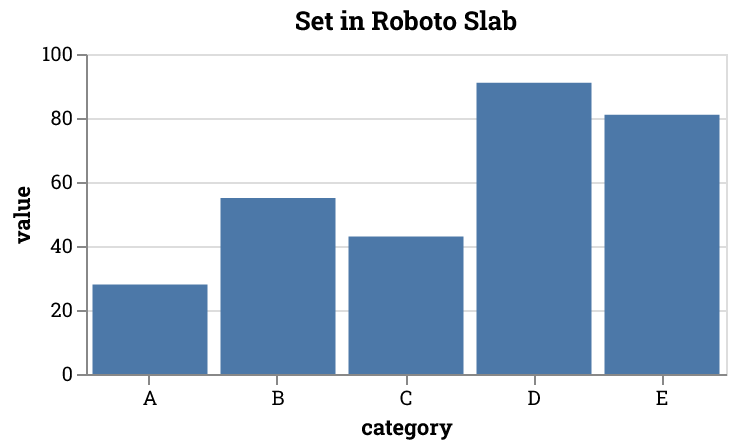
Without the request, the text falls back to the default sans-serif font. With missing_fonts set to error, the conversion fails instead.
Limit Automatic Downloads#
google_font_variant_threshold limits further font requests once a conversion has resolved that many Google Font variants. Configured, per-conversion, and automatically discovered families all count toward it. At or above the threshold, the next font request fails the conversion. A single request can take the total above the threshold when it resolves several variants.
Google Fonts downloads are controlled by these font options only. allowed_base_urls governs data and image URLs and has no effect on fonts.
On a public server, combine the threshold with --google-font-cache-miss-penalty-ms. The penalty charges extra request budget for every font lookup that misses the on-disk cache, including lookups for families that do not exist.
$ vl-convert serve \
>   --auto-google-fonts \
>   --google-font-variant-threshold 16 \
>   --per-ip-budget-ms 30000 \
>   --google-font-cache-miss-penalty-ms 250
Google Fonts Cache#
Downloaded Google Fonts are cached on disk and reused across conversions and process restarts. The cache holds both the Google Fonts CSS responses and the font files. Its directory is the platform cache directory plus vl-convert/google-fonts, such as ~/.cache/vl-convert/google-fonts on Linux or ~/Library/Caches/vl-convert/google-fonts on macOS. Set the VLC_GOOGLE_FONTS_CACHE_DIR environment variable to move it, or set it to none to disable caching and download fonts on every conversion. Set the variable before starting VlConvert.
Cached font files are evicted least-recently-used once they exceed a 512 MB cap. The cap applies to the whole process and can be changed at runtime.
Pass --google-fonts-cache-size-mb when starting the server to set the cap. When the admin API is enabled, GET /admin/config/fonts/cache returns the capacity and cache directory. PUT changes the capacity without a restart and returns both fields. The directory is read-only:
$ curl -X PUT http://127.0.0.1:3001/admin/config/fonts/cache \
>   -H "Authorization: Bearer $VLC_ADMIN_API_KEY" \
>   -H 'Content-Type: application/json' \
>   --data '{"max_size_mb": 128}'
{"max_size_mb": null} restores the default.
Embed Fonts in SVG and HTML#
Set embed_local_fonts to include the fonts a chart uses as base64 @font-face rules in SVG and HTML output. VlConvert subsets embedded fonts by default so the output contains only the glyphs the chart uses on first render. Set subset_fonts to false when the text may change later. Passing bundle to an SVG conversion also embeds its fonts and images so the file is self-contained.
PNG and JPEG contain rendered pixels, and PDF output always embeds the fonts it needs, so consumers of those formats do not need the font files.
Embedding increases output size and redistributes the font file, so confirm that the font license permits it.
See Font Introspection to list the fonts VlConvert resolves for a chart.