Quick Start#
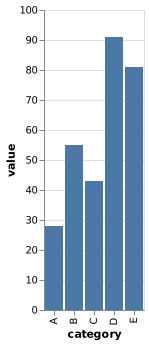
This example renders a small Vega-Lite bar chart with inline data as chart.png. See Loading Data and Images for configuration options when a chart loads data from a URL or file.
Save this specification:
chart.vl.json
{
  "$schema": "https://vega.github.io/schema/vega-lite/v6.json",
  "data": {
    "values": [
      {"category": "A", "value": 28},
      {"category": "B", "value": 55},
      {"category": "C", "value": 43},
      {"category": "D", "value": 91},
      {"category": "E", "value": 81}
    ]
  },
  "mark": "bar",
  "encoding": {
    "x": {"field": "category", "type": "nominal"},
    "y": {"field": "value", "type": "quantitative"}
  }
}
Start the server in one terminal:
$ vl-convert serve --port 3000
Save this complete request body as request.json:
request.json
{
  "spec": {
    "$schema": "https://vega.github.io/schema/vega-lite/v6.json",
    "data": {
      "values": [
        {
          "category": "A",
          "value": 28
        },
        {
          "category": "B",
          "value": 55
        },
        {
          "category": "C",
          "value": 43
        },
        {
          "category": "D",
          "value": 91
        },
        {
          "category": "E",
          "value": 81
        }
      ]
    },
    "mark": "bar",
    "encoding": {
      "x": {
        "field": "category",
        "type": "nominal"
      },
      "y": {
        "field": "value",
        "type": "quantitative"
      }
    }
  },
  "scale": 2
}
Use curl to POST the request from a second terminal:
$ curl http://127.0.0.1:3000/vegalite/png \
>   -H 'Content-Type: application/json' \
>   --data-binary @request.json \
>   --output chart.png
The endpoint returns PNG bytes, which curl writes to chart.png. See Converting from Vega-Lite for the other endpoints and Server Overview for additional features the server provides.
The specification renders as this chart: