Quick Start#
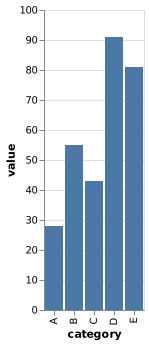
This example renders a small Vega-Lite bar chart with inline data as chart.png. See Loading Data and Images for configuration options when a chart loads data from a URL or file.
Save this specification:
chart.vl.json
{
  "$schema": "https://vega.github.io/schema/vega-lite/v6.json",
  "data": {
    "values": [
      {"category": "A", "value": 28},
      {"category": "B", "value": 55},
      {"category": "C", "value": 43},
      {"category": "D", "value": 91},
      {"category": "E", "value": 81}
    ]
  },
  "mark": "bar",
  "encoding": {
    "x": {"field": "category", "type": "nominal"},
    "y": {"field": "value", "type": "quantitative"}
  }
}
Add these dependencies to Cargo.toml:
Cargo.toml
[dependencies]
tokio = { version = "1", features = ["macros", "rt-multi-thread"] }
vl-convert-rs = "2.0.0-rc6"
Use this complete src/main.rs which reads the chart.vl.json file saved above:
src/main.rs
use vl_convert_rs::{anyhow, PngOpts, VlConverter, VlOpts};

#[tokio::main]
async fn main() -> anyhow::Result<()> {
    let spec = std::fs::read_to_string("chart.vl.json")?;
    let converter = VlConverter::new();
    let output = converter
        .vegalite_to_png(
            spec,
            VlOpts::default(),
            PngOpts {
                scale: Some(2.0),
                ..Default::default()
            },
        )
        .await?;
    std::fs::write("chart.png", output.data)?;
    Ok(())
}
Run cargo run. Conversion methods return output structs where the data property holds the rendered bytes. See Converting from Vega-Lite for the other supported output formats and Rust Converter Lifecycle for information on reusing the converter.
The specification renders as this chart: