
Themes#
A theme is a named configuration object that Vega-Lite applies while compiling a specification. Themes set defaults for colors, marks, axes, legends, fonts, and other visual properties. They apply to Vega-Lite input only because Vega input skips Vega-Lite compilation. For Vega input, pass a configuration object directly with config or --config.
VlConvert bundles the themes from the vega-themes package. Select a theme per conversion, or set default_theme in the converter configuration.
Every conversion example and image on this page uses this Vega-Lite specification. Save it as follows:
chart.vl.json
{
  "$schema": "https://vega.github.io/schema/vega-lite/v6.json",
  "title": "Revenue by Quarter",
  "width": 240,
  "height": 180,
  "data": {
    "values": [
      {"quarter": "Q1", "region": "North", "revenue": 42},
      {"quarter": "Q1", "region": "South", "revenue": 31},
      {"quarter": "Q1", "region": "West", "revenue": 18},
      {"quarter": "Q2", "region": "North", "revenue": 47},
      {"quarter": "Q2", "region": "South", "revenue": 36},
      {"quarter": "Q2", "region": "West", "revenue": 24},
      {"quarter": "Q3", "region": "North", "revenue": 52},
      {"quarter": "Q3", "region": "South", "revenue": 34},
      {"quarter": "Q3", "region": "West", "revenue": 29},
      {"quarter": "Q4", "region": "North", "revenue": 61},
      {"quarter": "Q4", "region": "South", "revenue": 40},
      {"quarter": "Q4", "region": "West", "revenue": 33}
    ]
  },
  "mark": "bar",
  "encoding": {
    "x": {"field": "quarter", "type": "nominal", "axis": {"labelAngle": 0}},
    "y": {"field": "revenue", "type": "quantitative"},
    "color": {"field": "region", "type": "nominal"}
  }
}
Use a Built-In Theme#
Themes included in vega-themes can be referenced by name. Visit the theme explorer to preview available themes.
from pathlib import Path

import vl_convert as vlc

spec = Path("chart.vl.json").read_text(encoding="utf-8")
svg = vlc.vegalite_to_svg(spec, theme="dark")
Path("chart.svg").write_text(svg, encoding="utf-8")
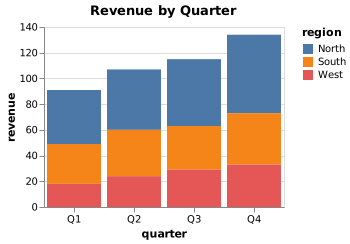
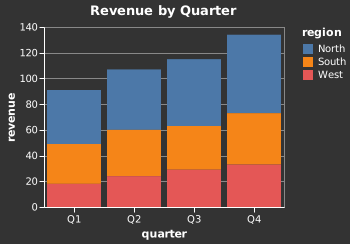
The same chart with the default configuration and with the dark theme:
List and Inspect Themes#
get_themes() maps each theme name to the Vega configuration it applies:
import json

import vl_convert as vlc

themes = vlc.get_themes()
print(json.dumps(sorted(themes), indent=2), end="\n\n")
print(json.dumps(themes["dark"], indent=2))
Output:
[
  "carbong10",
  "carbong100",
  "carbong90",
  "carbonwhite",
  "dark",
  "excel",
  "fivethirtyeight",
  "ggplot2",
  "googlecharts",
  "latimes",
  "powerbi",
  "quartz",
  "urbaninstitute",
  "vox"
]

{
  "background": "#333",
  "view": {
    "stroke": "#888"
  },
  "title": {
    "color": "#fff",
    "subtitleColor": "#fff"
  },
  "style": {
    "guide-label": {
      "fill": "#fff"
    },
    "guide-title": {
      "fill": "#fff"
    }
  },
  "axis": {
    "domainColor": "#fff",
    "gridColor": "#888",
    "tickColor": "#fff"
  }
}
Register a Custom Theme#
A custom theme file is a JSON object whose keys are theme names and whose values are Vega configuration objects. Save this example as themes.json:
themes.json
{
  "brand": {
    "background": "#f7f9fc",
    "range": {"category": ["#225ea8", "#41b6c4", "#a1dab4"]},
    "axis": {
      "labelColor": "#4c5a6b",
      "titleColor": "#4c5a6b",
      "gridColor": "#dfe5ee"
    },
    "title": {"color": "#225ea8"}
  }
}
A custom theme replaces a built-in theme with the same name.
import json
from pathlib import Path

import vl_convert as vlc

themes = json.loads(Path("themes.json").read_text(encoding="utf-8"))
vlc.configure(themes=themes)
svg = vlc.vegalite_to_svg(spec, theme="brand")
Path("chart.svg").write_text(svg, encoding="utf-8")
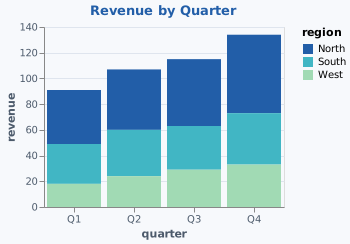
The brand theme applied to the same input. Only the selected theme changes:
See Configuration to set a default theme for every conversion, and Conversion Overrides to pass a raw config object instead of a named theme.