
VlConvert#
VlConvert converts Vega-Lite and Vega chart specifications to a variety of static and interactive formats including SVG, PNG, PDF, HTML, and more. It also converts Vega-Lite to Vega.
It runs the official Vega and Vega-Lite JavaScript libraries in an embedded Deno runtime, so it does not require a browser or Node.js installation. It bundles these libraries and their dependencies so access to an online CDN is not required for it to operate. Network requests occur only for remote data, images, fonts, or plugins that the input spec or configuration references.
How it works#
VlConvert’s core is a Rust library, and the project additionally provides Python, CLI, and HTTP server interfaces to the same conversion functionality. See Architecture for how the components fit together.
Example#
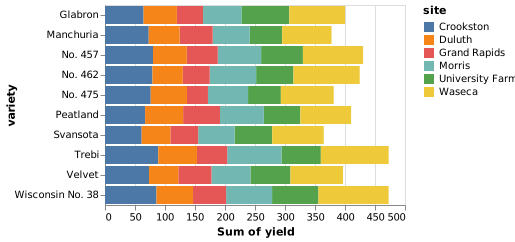
Use the interface tabs and format selector below to view example code snippets for converting a Vega-Lite specification to a variety of output formats.
stacked_bar_h.vl.json
{
  "$schema": "https://vega.github.io/schema/vega-lite/v6.json",
  "data": {
    "url": "https://cdn.jsdelivr.net/npm/vega-datasets@v2.9.0/data/barley.json"
  },
  "mark": "bar",
  "encoding": {
    "x": {"aggregate": "sum", "field": "yield"},
    "y": {"field": "variety"},
    "color": {"field": "site"}
  }
}
use vl_convert_rs::{anyhow, VlConverter, VlOpts, VlVersion};

#[tokio::main]
async fn main() -> anyhow::Result<()> {
    let spec = std::fs::read_to_string("stacked_bar_h.vl.json")?;
    let converter = VlConverter::new();
    let output = converter
        .vegalite_to_svg(
            spec,
            VlOpts {
                vl_version: VlVersion::v6_4,
                ..Default::default()
            },
            Default::default(),
        )
        .await?;
    std::fs::write("stacked_bar_h.svg", output.svg)?;
    Ok(())
}
[package]
name = "vl-convert-example"
version = "0.1.0"
edition = "2021"

[dependencies]
serde_json = "1"
tokio = { version = "1", features = ["macros", "rt-multi-thread"] }
vl-convert-rs = "=2.0.0-rc7"
from pathlib import Path

import vl_convert as vlc

spec = Path("stacked_bar_h.vl.json").read_text(encoding="utf-8")
svg = vlc.vegalite_to_svg(spec, vl_version="6.4")
Path("stacked_bar_h.svg").write_text(svg, encoding="utf-8")
[project]
name = "vl-convert-example"
version = "0.1.0"
requires-python = ">=3.10"
dependencies = ["vl-convert-python==2.0.0rc7"]
Download a prebuilt executable, or build it with Cargo:
$ cargo install vl-convert \
>   --version '=2.0.0-rc7' \
>   --locked
Perform the conversion:
$ vl-convert vl2svg \
>   --input stacked_bar_h.vl.json \
>   --output stacked_bar_h.svg \
>   --vl-version 6.4
Download a prebuilt executable, or build it with Cargo:
$ cargo install vl-convert \
>   --version '=2.0.0-rc7' \
>   --locked
Start the server in one terminal:
$ vl-convert serve --port 3000
Save this request body:
request.json
{
  "spec": {
    "$schema": "https://vega.github.io/schema/vega-lite/v6.json",
    "data": {
      "url": "https://cdn.jsdelivr.net/npm/vega-datasets@v2.9.0/data/barley.json"
    },
    "mark": "bar",
    "encoding": {
      "x": {
        "aggregate": "sum",
        "field": "yield"
      },
      "y": {
        "field": "variety"
      },
      "color": {
        "field": "site"
      }
    }
  },
  "vl_version": "6.4"
}
Send the request from a second terminal:
$ curl http://127.0.0.1:3000/vegalite/svg \
>   -H 'Content-Type: application/json' \
>   --data-binary @request.json \
>   --output stacked_bar_h.svg
use vl_convert_rs::{anyhow, PngOpts, VlConverter, VlOpts, VlVersion};

#[tokio::main]
async fn main() -> anyhow::Result<()> {
    let spec = std::fs::read_to_string("stacked_bar_h.vl.json")?;
    let converter = VlConverter::new();
    let output = converter
        .vegalite_to_png(
            spec,
            VlOpts {
                vl_version: VlVersion::v6_4,
                ..Default::default()
            },
            PngOpts {
                scale: Some(2.0),
                ..Default::default()
            },
        )
        .await?;
    std::fs::write("stacked_bar_h.png", output.data)?;
    Ok(())
}
[package]
name = "vl-convert-example"
version = "0.1.0"
edition = "2021"

[dependencies]
serde_json = "1"
tokio = { version = "1", features = ["macros", "rt-multi-thread"] }
vl-convert-rs = "=2.0.0-rc7"
from pathlib import Path

import vl_convert as vlc

spec = Path("stacked_bar_h.vl.json").read_text(encoding="utf-8")
png = vlc.vegalite_to_png(spec, vl_version="6.4", scale=2)
Path("stacked_bar_h.png").write_bytes(png)
[project]
name = "vl-convert-example"
version = "0.1.0"
requires-python = ">=3.10"
dependencies = ["vl-convert-python==2.0.0rc7"]
Download a prebuilt executable, or build it with Cargo:
$ cargo install vl-convert \
>   --version '=2.0.0-rc7' \
>   --locked
Perform the conversion:
$ vl-convert vl2png \
>   --input stacked_bar_h.vl.json \
>   --output stacked_bar_h.png \
>   --vl-version 6.4 \
>   --scale 2
Download a prebuilt executable, or build it with Cargo:
$ cargo install vl-convert \
>   --version '=2.0.0-rc7' \
>   --locked
Start the server in one terminal:
$ vl-convert serve --port 3000
Save this request body:
request.json
{
  "spec": {
    "$schema": "https://vega.github.io/schema/vega-lite/v6.json",
    "data": {
      "url": "https://cdn.jsdelivr.net/npm/vega-datasets@v2.9.0/data/barley.json"
    },
    "mark": "bar",
    "encoding": {
      "x": {
        "aggregate": "sum",
        "field": "yield"
      },
      "y": {
        "field": "variety"
      },
      "color": {
        "field": "site"
      }
    }
  },
  "vl_version": "6.4",
  "scale": 2
}
Send the request from a second terminal:
$ curl http://127.0.0.1:3000/vegalite/png \
>   -H 'Content-Type: application/json' \
>   --data-binary @request.json \
>   --output stacked_bar_h.png
use vl_convert_rs::{anyhow, JpegOpts, VlConverter, VlOpts, VlVersion};

#[tokio::main]
async fn main() -> anyhow::Result<()> {
    let spec = std::fs::read_to_string("stacked_bar_h.vl.json")?;
    let converter = VlConverter::new();
    let output = converter
        .vegalite_to_jpeg(
            spec,
            VlOpts {
                vl_version: VlVersion::v6_4,
                ..Default::default()
            },
            JpegOpts {
                scale: Some(2.0),
                quality: Some(90),
            },
        )
        .await?;
    std::fs::write("stacked_bar_h.jpg", output.data)?;
    Ok(())
}
[package]
name = "vl-convert-example"
version = "0.1.0"
edition = "2021"

[dependencies]
serde_json = "1"
tokio = { version = "1", features = ["macros", "rt-multi-thread"] }
vl-convert-rs = "=2.0.0-rc7"
from pathlib import Path

import vl_convert as vlc

spec = Path("stacked_bar_h.vl.json").read_text(encoding="utf-8")
jpeg = vlc.vegalite_to_jpeg(
    spec,
    vl_version="6.4",
    scale=2,
    quality=90,
)
Path("stacked_bar_h.jpg").write_bytes(jpeg)
[project]
name = "vl-convert-example"
version = "0.1.0"
requires-python = ">=3.10"
dependencies = ["vl-convert-python==2.0.0rc7"]
Download a prebuilt executable, or build it with Cargo:
$ cargo install vl-convert \
>   --version '=2.0.0-rc7' \
>   --locked
Perform the conversion:
$ vl-convert vl2jpeg \
>   --input stacked_bar_h.vl.json \
>   --output stacked_bar_h.jpg \
>   --vl-version 6.4 \
>   --scale 2 \
>   --quality 90
Download a prebuilt executable, or build it with Cargo:
$ cargo install vl-convert \
>   --version '=2.0.0-rc7' \
>   --locked
Start the server in one terminal:
$ vl-convert serve --port 3000
Save this request body:
request.json
{
  "spec": {
    "$schema": "https://vega.github.io/schema/vega-lite/v6.json",
    "data": {
      "url": "https://cdn.jsdelivr.net/npm/vega-datasets@v2.9.0/data/barley.json"
    },
    "mark": "bar",
    "encoding": {
      "x": {
        "aggregate": "sum",
        "field": "yield"
      },
      "y": {
        "field": "variety"
      },
      "color": {
        "field": "site"
      }
    }
  },
  "vl_version": "6.4",
  "scale": 2,
  "quality": 90
}
Send the request from a second terminal:
$ curl http://127.0.0.1:3000/vegalite/jpeg \
>   -H 'Content-Type: application/json' \
>   --data-binary @request.json \
>   --output stacked_bar_h.jpg
use vl_convert_rs::{anyhow, VlConverter, VlOpts, VlVersion};

#[tokio::main]
async fn main() -> anyhow::Result<()> {
    let spec = std::fs::read_to_string("stacked_bar_h.vl.json")?;
    let converter = VlConverter::new();
    let output = converter
        .vegalite_to_pdf(
            spec,
            VlOpts {
                vl_version: VlVersion::v6_4,
                ..Default::default()
            },
            Default::default(),
        )
        .await?;
    std::fs::write("stacked_bar_h.pdf", output.data)?;
    Ok(())
}
[package]
name = "vl-convert-example"
version = "0.1.0"
edition = "2021"

[dependencies]
serde_json = "1"
tokio = { version = "1", features = ["macros", "rt-multi-thread"] }
vl-convert-rs = "=2.0.0-rc7"
from pathlib import Path

import vl_convert as vlc

spec = Path("stacked_bar_h.vl.json").read_text(encoding="utf-8")
pdf = vlc.vegalite_to_pdf(spec, vl_version="6.4")
Path("stacked_bar_h.pdf").write_bytes(pdf)
[project]
name = "vl-convert-example"
version = "0.1.0"
requires-python = ">=3.10"
dependencies = ["vl-convert-python==2.0.0rc7"]
Download a prebuilt executable, or build it with Cargo:
$ cargo install vl-convert \
>   --version '=2.0.0-rc7' \
>   --locked
Perform the conversion:
$ vl-convert vl2pdf \
>   --input stacked_bar_h.vl.json \
>   --output stacked_bar_h.pdf \
>   --vl-version 6.4
Download a prebuilt executable, or build it with Cargo:
$ cargo install vl-convert \
>   --version '=2.0.0-rc7' \
>   --locked
Start the server in one terminal:
$ vl-convert serve --port 3000
Save this request body:
request.json
{
  "spec": {
    "$schema": "https://vega.github.io/schema/vega-lite/v6.json",
    "data": {
      "url": "https://cdn.jsdelivr.net/npm/vega-datasets@v2.9.0/data/barley.json"
    },
    "mark": "bar",
    "encoding": {
      "x": {
        "aggregate": "sum",
        "field": "yield"
      },
      "y": {
        "field": "variety"
      },
      "color": {
        "field": "site"
      }
    }
  },
  "vl_version": "6.4"
}
Send the request from a second terminal:
$ curl http://127.0.0.1:3000/vegalite/pdf \
>   -H 'Content-Type: application/json' \
>   --data-binary @request.json \
>   --output stacked_bar_h.pdf
use vl_convert_rs::{
    anyhow, HtmlOpts, Renderer, VlConverter, VlOpts, VlVersion,
};

#[tokio::main]
async fn main() -> anyhow::Result<()> {
    let spec = std::fs::read_to_string("stacked_bar_h.vl.json")?;
    let converter = VlConverter::new();
    let output = converter
        .vegalite_to_html(
            spec,
            VlOpts {
                vl_version: VlVersion::v6_4,
                ..Default::default()
            },
            HtmlOpts {
                bundle: true,
                renderer: Renderer::Svg,
            },
        )
        .await?;
    std::fs::write("stacked_bar_h.html", output.html)?;
    Ok(())
}
[package]
name = "vl-convert-example"
version = "0.1.0"
edition = "2021"

[dependencies]
serde_json = "1"
tokio = { version = "1", features = ["macros", "rt-multi-thread"] }
vl-convert-rs = "=2.0.0-rc7"
from pathlib import Path

import vl_convert as vlc

spec = Path("stacked_bar_h.vl.json").read_text(encoding="utf-8")
html = vlc.vegalite_to_html(
    spec,
    vl_version="6.4",
    bundle=True,
    renderer="svg",
)
Path("stacked_bar_h.html").write_text(html, encoding="utf-8")
[project]
name = "vl-convert-example"
version = "0.1.0"
requires-python = ">=3.10"
dependencies = ["vl-convert-python==2.0.0rc7"]
Download a prebuilt executable, or build it with Cargo:
$ cargo install vl-convert \
>   --version '=2.0.0-rc7' \
>   --locked
Perform the conversion:
$ vl-convert vl2html \
>   --input stacked_bar_h.vl.json \
>   --output stacked_bar_h.html \
>   --vl-version 6.4 \
>   --bundle \
>   --renderer svg
Download a prebuilt executable, or build it with Cargo:
$ cargo install vl-convert \
>   --version '=2.0.0-rc7' \
>   --locked
Start the server in one terminal:
$ vl-convert serve --port 3000
Save this request body:
request.json
{
  "spec": {
    "$schema": "https://vega.github.io/schema/vega-lite/v6.json",
    "data": {
      "url": "https://cdn.jsdelivr.net/npm/vega-datasets@v2.9.0/data/barley.json"
    },
    "mark": "bar",
    "encoding": {
      "x": {
        "aggregate": "sum",
        "field": "yield"
      },
      "y": {
        "field": "variety"
      },
      "color": {
        "field": "site"
      }
    }
  },
  "vl_version": "6.4",
  "bundle": true,
  "renderer": "svg"
}
Send the request from a second terminal:
$ curl http://127.0.0.1:3000/vegalite/html \
>   -H 'Content-Type: application/json' \
>   --data-binary @request.json \
>   --output stacked_bar_h.html
use vl_convert_rs::{anyhow, VlConverter, VlOpts, VlVersion};

#[tokio::main]
async fn main() -> anyhow::Result<()> {
    let spec = std::fs::read_to_string("stacked_bar_h.vl.json")?;
    let converter = VlConverter::new();
    let output = converter
        .vegalite_to_vega(
            spec,
            VlOpts {
                vl_version: VlVersion::v6_4,
                ..Default::default()
            },
        )
        .await?;
    let vega = serde_json::to_string_pretty(&output.spec)?;
    std::fs::write("stacked_bar_h.vg.json", vega)?;
    Ok(())
}
[package]
name = "vl-convert-example"
version = "0.1.0"
edition = "2021"

[dependencies]
serde_json = "1"
tokio = { version = "1", features = ["macros", "rt-multi-thread"] }
vl-convert-rs = "=2.0.0-rc7"
import json
from pathlib import Path

import vl_convert as vlc

spec = Path("stacked_bar_h.vl.json").read_text(encoding="utf-8")
vega = vlc.vegalite_to_vega(spec, vl_version="6.4")
Path("stacked_bar_h.vg.json").write_text(
    json.dumps(vega, indent=2) + "\n",
    encoding="utf-8",
)
[project]
name = "vl-convert-example"
version = "0.1.0"
requires-python = ">=3.10"
dependencies = ["vl-convert-python==2.0.0rc7"]
Download a prebuilt executable, or build it with Cargo:
$ cargo install vl-convert \
>   --version '=2.0.0-rc7' \
>   --locked
Perform the conversion:
$ vl-convert vl2vg \
>   --input stacked_bar_h.vl.json \
>   --output stacked_bar_h.vg.json \
>   --vl-version 6.4 \
>   --pretty
Download a prebuilt executable, or build it with Cargo:
$ cargo install vl-convert \
>   --version '=2.0.0-rc7' \
>   --locked
Start the server in one terminal:
$ vl-convert serve --port 3000
Save this request body:
request.json
{
  "spec": {
    "$schema": "https://vega.github.io/schema/vega-lite/v6.json",
    "data": {
      "url": "https://cdn.jsdelivr.net/npm/vega-datasets@v2.9.0/data/barley.json"
    },
    "mark": "bar",
    "encoding": {
      "x": {
        "aggregate": "sum",
        "field": "yield"
      },
      "y": {
        "field": "variety"
      },
      "color": {
        "field": "site"
      }
    }
  },
  "vl_version": "6.4"
}
Send the request from a second terminal:
$ curl http://127.0.0.1:3000/vegalite/vega \
>   -H 'Content-Type: application/json' \
>   --data-binary @request.json \
>   --output stacked_bar_h.vg.json
use vl_convert_rs::{anyhow, vegalite_to_url, UrlOpts};

fn main() -> anyhow::Result<()> {
    let spec = std::fs::read_to_string("stacked_bar_h.vl.json")?;
    let url = vegalite_to_url(spec, UrlOpts::default())?;
    println!("{url}");
    Ok(())
}
[package]
name = "vl-convert-example"
version = "0.1.0"
edition = "2021"

[dependencies]
serde_json = "1"
tokio = { version = "1", features = ["macros", "rt-multi-thread"] }
vl-convert-rs = "=2.0.0-rc7"
from pathlib import Path

import vl_convert as vlc

spec = Path("stacked_bar_h.vl.json").read_text(encoding="utf-8")
url = vlc.vegalite_to_url(spec)
print(url)
[project]
name = "vl-convert-example"
version = "0.1.0"
requires-python = ">=3.10"
dependencies = ["vl-convert-python==2.0.0rc7"]
Download a prebuilt executable, or build it with Cargo:
$ cargo install vl-convert \
>   --version '=2.0.0-rc7' \
>   --locked
Perform the conversion:
$ vl-convert vl2url --input stacked_bar_h.vl.json
Download a prebuilt executable, or build it with Cargo:
$ cargo install vl-convert \
>   --version '=2.0.0-rc7' \
>   --locked
Start the server in one terminal:
$ vl-convert serve --port 3000
Save this request body:
request.json
{
  "spec": {
    "$schema": "https://vega.github.io/schema/vega-lite/v6.json",
    "data": {
      "url": "https://cdn.jsdelivr.net/npm/vega-datasets@v2.9.0/data/barley.json"
    },
    "mark": "bar",
    "encoding": {
      "x": {
        "aggregate": "sum",
        "field": "yield"
      },
      "y": {
        "field": "variety"
      },
      "color": {
        "field": "site"
      }
    }
  }
}
Send the request from a second terminal:
$ curl http://127.0.0.1:3000/vegalite/url \
>   -H 'Content-Type: application/json' \
>   --data-binary @request.json
{
  "$schema": "https://vega.github.io/schema/vega/v6.json",
  "background": "white",
  "padding": 5,
  "width": 300,
  "style": "cell",
  "data": [
    {
      "name": "source_0",
      "url": "https://cdn.jsdelivr.net/npm/vega-datasets@v2.9.0/data/barley.json",
      "format": {
        "type": "json"
      },
      "transform": [
        {
          "type": "aggregate",
          "groupby": [
            "variety",
            "site"
          ],
          "ops": [
            "sum"
          ],
          "fields": [
            "yield"
          ],
          "as": [
            "sum_yield"
          ]
        },
        {
          "type": "stack",
          "groupby": [
            "variety"
          ],
          "field": "sum_yield",
          "sort": {
            "field": [
              "site"
            ],
            "order": [
              "ascending"
            ]
          },
          "as": [
            "sum_yield_start",
            "sum_yield_end"
          ],
          "offset": "zero"
        },
        {
          "type": "filter",
          "expr": "isValid(datum[\"sum_yield\"]) && isFinite(+datum[\"sum_yield\"])"
        }
      ]
    }
  ],
  "signals": [
    {
      "name": "y_step",
      "value": 20
    },
    {
      "name": "height",
      "update": "bandspace(domain('y').length, 0.1, 0.05) * y_step"
    }
  ],
  "marks": [
    {
      "name": "marks",
      "type": "rect",
      "style": [
        "bar"
      ],
      "from": {
        "data": "source_0"
      },
      "encode": {
        "update": {
          "fill": {
            "scale": "color",
            "field": "site"
          },
          "ariaRoleDescription": {
            "value": "bar"
          },
          "description": {
            "signal": "\"Sum of yield: \" + (format(datum[\"sum_yield\"], \"\")) + \"; variety: \" + (isValid(datum[\"variety\"]) ? isArray(datum[\"variety\"]) ? join(datum[\"variety\"], ' ') : datum[\"variety\"] : \"\"+datum[\"variety\"]) + \"; site: \" + (isValid(datum[\"site\"]) ? isArray(datum[\"site\"]) ? join(datum[\"site\"], ' ') : datum[\"site\"] : \"\"+datum[\"site\"])"
          },
          "x": {
            "scale": "x",
            "field": "sum_yield_end"
          },
          "x2": {
            "scale": "x",
            "field": "sum_yield_start"
          },
          "y": {
            "scale": "y",
            "field": "variety"
          },
          "height": {
            "signal": "max(0.25, bandwidth('y'))"
          }
        }
      }
    }
  ],
  "scales": [
    {
      "name": "x",
      "type": "linear",
      "domain": {
        "data": "source_0",
        "fields": [
          "sum_yield_start",
          "sum_yield_end"
        ]
      },
      "range": [
        0,
        {
          "signal": "width"
        }
      ],
      "nice": true,
      "zero": true
    },
    {
      "name": "y",
      "type": "band",
      "domain": {
        "data": "source_0",
        "field": "variety",
        "sort": true
      },
      "range": {
        "step": {
          "signal": "y_step"
        }
      },
      "paddingInner": 0.1,
      "paddingOuter": 0.05
    },
    {
      "name": "color",
      "type": "ordinal",
      "domain": {
        "data": "source_0",
        "field": "site",
        "sort": true
      },
      "range": "category"
    }
  ],
  "axes": [
    {
      "scale": "x",
      "orient": "bottom",
      "gridScale": "y",
      "grid": true,
      "tickCount": {
        "signal": "ceil(width/40)"
      },
      "domain": false,
      "labels": false,
      "aria": false,
      "maxExtent": 0,
      "minExtent": 0,
      "ticks": false,
      "zindex": 0
    },
    {
      "scale": "x",
      "orient": "bottom",
      "grid": false,
      "title": "Sum of yield",
      "labelFlush": true,
      "labelOverlap": true,
      "tickCount": {
        "signal": "ceil(width/40)"
      },
      "zindex": 0
    },
    {
      "scale": "y",
      "orient": "left",
      "grid": false,
      "title": "variety",
      "zindex": 0
    }
  ],
  "legends": [
    {
      "fill": "color",
      "symbolType": "square",
      "title": "site"
    }
  ]
}
Choose an Interface#
All four VlConvert interfaces share one conversion engine, so a chart renders the same way from each of them given the same configuration and environment. Each interface has specialized documentation.
Embed vl-convert-rs directly in Rust applications.
Use vl-convert-python from Python applications and Altair workflows.
Run vl-convert from scripts, shells, and build pipelines.
Run vl-convert serve as an HTTP rendering worker.